- Home Page /
- Electronics /
- Computer Accessories /
- Computer Accessories & Peripherals /
- Keyboards, Mice & Accessories /
- Mice /
- 3Dconnexion 3DX-700028 SpaceNavigator 3D Mous...
0 ratings







Item #:
166855
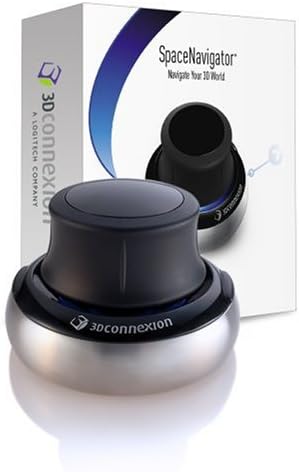
3Dconnexion 3DX-700028 SpaceNavigator 3D Mouse
89% of respondents would recommend this to a friend
Item #:
166855
NZD 567
Price Details
Excluding Shipping & Custom charges ( Shipping and custom charges will be calculated on checkout )
*All items will import from US
Afterpay Information

Split your bill into 4 payments of NZD 141.75 interest-free
 Add the item to your cart
 Select Afterpay at checkout
 Fill in your details
 Complete your first payment
and pay the remaining in easy instalments or according to the payment plan you selected
Here’s why you should Afterpay it

Get everything you need now..
Shop thousands of brands and millions of products, online and in-store.

Pay over six weeks.
Make the first payment upfront and the rest over time. Always interest-free when you pay it in 4.

No fees when you pay on time.
We’ll send you reminders and cap late payments to help you get back on track.
(1) Terms and conditions. apply. (2) Installment Agreement. (3) Eligible for customers in. New Zealand, (4) Your final payment plan may vary depending on your credit history.
0 ratings
Write a review
In stock
 Imported from USA store
QTY:
Order now and get it around Thursday, July 30
Secured transaction
Ubuy works hard to protect your security and privacy. Our advanced payment security system ensures confidentiality by encrypting your information during transmission using AES (Advanced Encryption Standards) and SSL (Secure Socket Layer) protocols. Your payment details are 100% secure as we do not share your payment details with third party sellers.
Our Top Logistics Partners


Why use a SpaceNavigator 3D mouse? The key advantage of a SpaceNavigator over a mouse and keyboard is the ease of performing intricate adjustments to camera views and models.

Buy Now Pay Later

Fast
Shipping

Free
Return*

Secure Packaging

100% Original Products

PCI DSS Compliance

ISO 27001 Certified


Note: Step Down Voltage Transformer required for using electronics products of US store (110-120). Recommended power converters Buy Now.


What Stands Out
Enhanced Navigation
The SpaceNavigator offers precise 3D navigation, allowing users to intuitively explore 3D environments with effortless control, enhancing productivity in design and modeling tasks.
Ergonomic Design
Its ergonomic shape ensures comfort during prolonged use, reducing hand strain and allowing artists and designers to focus on their work without physical discomfort.
Customizable Shortcuts
The customizable buttons provide quick access to frequently used functions, streamlining workflows and enabling users to work more efficiently with their favorite design tools.
Product Details
- Advanced 6 degrees-of-freedom optical sensor for precise navigation
- Simultaneously pan, zoom and rotate 3D models with ease
- 2 programmable function keys for customized shortcuts
- SpaceNavigator SE model includes commercial use license and full technical support
- Ideal for 3D designers, CAD engineers, architects for enhanced productivity
- Universal compatibility: Works with all major 3D applications on Windows, Mac, or Linux
| Product Dimensions (L x W x H) | 3 x 3 x 2 inches (7.6 x 7.6 x 5.1 cm) |
| Item Weight | 1.06 pounds (480 grams) |
| Item model number | 3DX-700028 |
| Batteries | 1 Lithium Ion batteries required. |
| Is Discontinued By Manufacturer | No |
| Date First Available | November 28, 2006 |
| Department | Computers |
| Manufacturer | 3Dconnexion |
| Language | English, English, English, English |
Who Should Buy?

-
3D Designers
Ideal for professional 3D designers who need precision and seamless navigation in modeling software like CAD.
-
Architects
Helpful for architects who benefit from intuitive control in 3D visualization and rendering applications.
-
Game Developers
Perfect for game developers seeking enhanced control and editing capabilities in game design environments.

-
Casual Users
Not suitable for casual users who primarily use traditional mouse functions and do not work with 3D software.
-
Office Workers
Office environments may not utilize the advanced capabilities of a 3D mouse, making it unnecessary for standard tasks.
-
Budget-Conscious
Those on a tight budget might find other conventional mice more affordable and sufficient for basic computer tasks.
Product Description
Have any Query? Chat with us
Product Buying Guide
The 3Dconnexion 3DX-700028 SpaceNavigator 3D Mouse is an advanced tool designed to enhance the workflow of 3D designers, CAD engineers, and architects. With its advanced 6 degrees-of-freedom optical sensor and two programmable function keys, this device provides seamless navigation and control over 3D models. Whether you're looking to improve precision, efficiency, or overall user experience, the SpaceNavigator 3D mouse offers a range of benefits that cater to professionals in the field of 3D design and engineering.
Product Specifications
- Advanced 6 degrees-of-freedom optical sensor
- Simultaneously pan, zoom and rotate 3D models
- 2 programmable function keys
- Universal compatibility: Works with all favorite 3D applications on Windows, Mac, or Linux
- It comes with a commercial use license and full technical support
Key Features
- Enhanced precision and control over 3D models
- Two programmable function keys for customized shortcuts
- Universal compatibility across Windows, Mac, and Linux systems
- Commercial use license and full technical support
Usage Scenarios
- Performing intricate adjustments to camera views and models without repeatedly stopping to change direction, zoom, or rotate
- Serving as an indispensable asset in improving efficiency and reducing repetitive stress for CAD engineers and designers
- Conserving space with its small footprint while working with other peripherals
Usage Scenarios
The 3Dconnexion 3DX-700028 SpaceNavigator 3D Mouse competes with other 3D navigation devices available in the market, offering advanced features such as simultaneous pan, zoom, and rotate functions, programmable keys, commercial use license, and universal compatibility. These features set it apart as an ideal choice for 3D professionals seeking precision, efficiency, and ease of use in their workflows.
Some User Review
- I find your products are an indispensable asset in doing my job easier and quicker and with less repetitive stress.
- An essential device for anyone working with a CAD system.
- The SpaceNavigator provides enhanced precision and efficiency, making intricate adjustments a seamless process.
Competitors
The SpaceNavigator 3D mouse offers advanced 3D technology at a competitive price, providing users with affordable precision comparable to many 2D mice. The commercial use license and full technical support further enhance its value proposition, making it a cost-effective investment for professionals in the 3D design and engineering industry.
Buying Considerations
- Consider the specific 3D applications you use to ensure compatibility with the SpaceNavigator 3D mouse
- Evaluate the need for enhanced precision and control over 3D models in your workflow
- Assess the importance of commercial use license and full technical support for professional applications
Conclusion
The 3Dconnexion 3DX-700028 SpaceNavigator 3D Mouse offers unparalleled precision, control, and efficiency for 3D designers, CAD engineers, and architects. With its advanced features, universal compatibility, and cost-effective pricing, it stands as an indispensable tool in improving workflow and reducing repetitive stress, making it an ideal investment for professionals seeking to elevate their 3D design and engineering capabilities.
View LessThe 3Dconnexion 3DX-700028 SpaceNavigator 3D Mouse is an advanced tool designed to enhance the workflow of 3D designers, CAD engineers, and architects. With its advanced 6 degrees-of-freedom optical sensor and two programmable function keys, this device provides seamless navigation and control over 3D models. Whether you're looking to improve precision, efficiency, or overall user experience, the SpaceNavigator 3D mouse offers a range of benefits that cater to professionals in the field of 3D design and engineering. Continue Reading
Customer Questions & Answers
-
Question:
What is the 3Dconnexion 3DX-700028 SpaceNavigator 3D Mouse used for?
Answer: The 3Dconnexion SpaceNavigator 3D Mouse specializes in 3D navigation, allowing users to intuitively manipulate 3D models while working in software like CAD, 3D modeling, and virtual reality applications. By enabling pan, zoom, and rotate functionalities, it offers precise control that standard mice cannot provide. This makes it invaluable for architects, designers, and engineers who need to interact with complex 3D environments effortlessly. -
Question:
How does the SpaceNavigator enhance productivity for professionals?
Answer: The SpaceNavigator significantly improves productivity by streamlining navigation in 3D applications. Its dual-functionality allows users to move through 3D space while simultaneously using a regular mouse for selection tasks. This seamless integration reduces the time spent on navigation, allowing professionals to focus more on creativity and design, especially beneficial during presentations or collaborative sessions where fluid motion is crucial. -
Question:
Is the 3Dconnexion SpaceNavigator compatible with commonly used software?
Answer: Yes, the SpaceNavigator is compatible with a wide range of popular 3D applications such as AutoCAD, SolidWorks, SketchUp, and Blender, among others. The device works by recognizing these software platforms, allowing users to enjoy customized controls and shortcuts tailored to their needs. This compatibility ensures that users can integrate the 3D mouse into their existing workflows without any hassle. -
Question:
What ergonomic benefits does the SpaceNavigator provide?
Answer: The SpaceNavigator is designed with ergonomics in mind, promoting a comfortable grip and reducing strain during long modeling sessions. Its stable base and slight incline allow for natural hand positioning, which can help minimize fatigue compared to traditional mice. This ergonomic advantage is particularly noticeable for professionals who dedicate extended hours to intricate design tasks. -
Question:
Can the SpaceNavigator be used alongside a standard mouse?
Answer: Absolutely! The SpaceNavigator can be used in conjunction with a standard mouse, enhancing the overall workflow. While the SpaceNavigator handles 3D navigation, the regular mouse can be used for selection and clicking actions. This dual-use approach ensures that users can operate efficiently in complex environments, facilitating a more integrated design experience. -
Question:
Does the SpaceNavigator come with programmable buttons?
Answer: Yes, the 3Dconnexion SpaceNavigator features programmable buttons that can be customized to perform specific functions or shortcuts in various applications. Users can configure these buttons to streamline their workflows, reducing the need to navigate through menus. For instance, assigning frequently used commands allows professionals to quickly execute tasks, boosting efficiency during creative projects. -
Question:
Are there any specific system requirements for the SpaceNavigator?
Answer: The SpaceNavigator is compatible with both Windows and macOS operating systems, with specific software requirements based on the applications being used. To ensure optimal performance, it's advisable to check for any necessary drivers or updates from the 3Dconnexion website. This guarantees that users can utilize the full capabilities of the device across their preferred software. -
Question:
What types of users benefit most from the SpaceNavigator?
Answer: The SpaceNavigator caters to a variety of users, particularly professionals in architecture, engineering, and product design. Artists and animators also find value in its capabilities, as it enhances the fluidity of their work in 3D environments. This device is beneficial for anyone who regularly engages with complex 3D models, helping them navigate and manipulate designs more intuitively. -
Question:
How does the SpaceNavigator handle different types of 3D software?
Answer: The SpaceNavigator adapts to various 3D software environments by offering specific profiles that match user needs. This means that it can intelligently switch modes based on the application being used, allowing for tailored controls that enhance usability. These customizable profiles make it suitable for a diverse set of tasks, from architectural visualization to mechanical design. -
Question:
Where can I buy the 3Dconnexion 3DX-700028 SpaceNavigator 3D Mouse in New Zealand?
Answer: You can purchase the 3Dconnexion 3DX-700028 SpaceNavigator 3D Mouse from Ubuy, which offers a convenient platform for selecting and acquiring this advanced 3D navigation device in New Zealand. Ubuy provides a user-friendly experience, allowing you to explore product specifications and find the best options for your needs.
3Dconnexion Mice 3DX-700028 Editorial Review


No editorial reviews found
Customer Reviews & Ratings
1267 customers ratings
-
5 Star
78%
-
4 Star
11%
-
3 Star
4%
-
2 Star
2%
-
1 Star
5%
Review this product
Share your thoughts with other customers
Platform Trust & Buyer Confidence

NA
Naylz
Verified buyer
“Purchased a YAMATIC 3/4" Shaft Horizontal Pressure Washer Pump 3400 PSI 2.5 GPM as a replacement for my GC190 water blaster. Fits perfectly and works well. Easy transaction and reasonable delivery to New Zealand.”
6 June 2026 · via Trustpilot
EG
Eduardo
Verified buyer
“great service, quick delivery and comunication”
2 June 2026 · via Trustpilot
DR
Dave
Verified buyer
“First time using Ubuy. Simple to use, well packed and faster than expected delivery. Was about the only way to get this item I've been after for almost a year … thank you Ubuy!”
15 May 2026 · via Trustpilot
DD
David
Verified buyer
“First time using Ubuy and very impressed. Items arrived from the USA super fast and are such a top-quality product. I will definitely be back to purchase again. Cannot recommend you highly enough for a hassle-free & efficient service. Thank you so much. I am one very happy customer.”
14 May 2026 · via Trustpilot
J
John
Verified buyer
“Very happy with the light. I wanted something a little different for a bedside lamp and find this is great. Easy to operate with a single button to turn it off and on and control the brightness and colour temperature. The item was sent quickly and a hassle free purchase.”
23 April 2026 · via Trustpilot
Secure Checkout
Global Delivery
Easy Returns
Genuine Products
Product Price History
Important information
- Limitations : For products shipped internationally, please note that any manufacturer warranty may not be valid; manufacturer service options may not be available; product manuals, instructions, and safety warnings may not be in destination country languages; the products (and accompanying materials) may not be designed in accordance with destination country standards, specifications, and labeling requirements; and the products may not conform to destination country voltage and other electrical standards (requiring use of an adapter or converter if appropriate). The recipient is responsible for assuring that the product can be lawfully imported to the destination country. When ordering from Ubuy or its affiliates, the recipient is the importer of record and must comply with all laws and regulations of the destination country.
- Not all the products listed on Ubuy are for sale, as Ubuy is a global search engine. Products are subject to export/trade regulations.
NZD 567
Order now and get it around Thursday, July 30
This item is not restrict in my country.(Please click on above link if this item is not restrict in your country, So our team will review and allow.)
QTY:
Secured transaction
PCI DSS compliant and ISO 27001:2022 certified, with encrypted payments and full buyer protection on every order.
Our Top Logistics Partners
Fastest cross-border delivery
Features & Benefits
- Perform intricate adjustments to camera views and models
- Can do all three (change direction, zoom, or rotate) at once
- Works with all your favorite 3D applications, on Windows, Mac, or Linux
- Affordable precision
- Small footprint, conserves space
- Ideal for 3D designers, CAD engineers, architects
Ubuy Assurance
Experience worry-free shopping with 100% original products, PCI DSS-compliant payment security, ISO 27001-certified data protection, the fastest cross-border delivery, free returns *, and secure packaging on every order.