- Home Page /
- Electronics /
- Computer Accessories /
- Computer Components /
- Computer Internal Components /
- Internal TV Tuner & Capture Cards /
- Elgato Game Capture HD60 - Next Generation Ga...
0 ratings


Item #:
1236214
Elgato Game Capture HD60 - Next Generation Gameplay Sharing for Playstation 4, Xbox One & Xbox 360, 1080p quality with 60 fps
90% of respondents would recommend this to a friend
Item #:
1236214
NZD 482
Price Details
Excluding Shipping & Custom charges ( Shipping and custom charges will be calculated on checkout )
*All items will import from US
Afterpay Information

Split your bill into 4 payments of NZD 120.5 interest-free
 Add the item to your cart
 Select Afterpay at checkout
 Fill in your details
 Complete your first payment
and pay the remaining in easy instalments or according to the payment plan you selected
Here’s why you should Afterpay it

Get everything you need now..
Shop thousands of brands and millions of products, online and in-store.

Pay over six weeks.
Make the first payment upfront and the rest over time. Always interest-free when you pay it in 4.

No fees when you pay on time.
We’ll send you reminders and cap late payments to help you get back on track.
(1) Terms and conditions. apply. (2) Installment Agreement. (3) Eligible for customers in. New Zealand, (4) Your final payment plan may vary depending on your credit history.
In stock
 Imported from USA store
QTY:
Order now and get it around Sunday, July 05
Secured transaction
Ubuy works hard to protect your security and privacy. Our advanced payment security system ensures confidentiality by encrypting your information during transmission using AES (Advanced Encryption Standards) and SSL (Secure Socket Layer) protocols. Your payment details are 100% secure as we do not share your payment details with third party sellers.
Our Top Logistics Partners


Next Generation Gameplay Sharing

Buy Now Pay Later

Fast
Shipping

Free
Return*

Secure Packaging

100% Original Products

PCI DSS Compliance

ISO 27001 Certified


Note: Step Down Voltage Transformer required for using electronics products of US store (110-120). Recommended power converters Buy Now.


What Stands Out
High Definition Capture
Experience impressive 1080p quality at 60 frames per second, ensuring smooth and sharp visuals that bring your gameplay to life on any streaming platform.
Compatibility
Designed for PlayStation 4, Xbox One, and Xbox 360, the Elgato Game Capture HD60 seamlessly integrates with popular gaming consoles, enhancing your streaming capabilities without compatibility issues.
User-Friendly Software
Elgato's intuitive software makes gameplay sharing effortless, allowing users to easily record, edit, and stream in real-time, catering to both beginners and seasoned streamers.
Product Details
- Record gameplay from Xbox, PlayStation, or Nintendo consoles
- Captures in flawless 1080p quality at 60 fps
- Unlimited capture directly to PC or Mac with Flashback Recording
- One-click sharing to YouTube, Facebook, and Twitter
- Stream Command allows webcam and overlay integration
- Includes Elgato Game Capture HD60, USB cable, and HDMI cable
| Hardware Interface | USB 2.0 |
| Video Capture Resolution | 1080p |
| Operating System | Mac OS Sierra, Windows 10 (64bit) |
| Antenna Location | Video Recording |
| Other Special Features of the Product | Advanced hardware H.264 encoding, Flashback Recording, Stream Command |
| Platform | Nintendo Wii U, PlayStation 4, Xbox 360, Xbox One |
| AV Output | HDMI |
| Compatible Devices | Gaming Console |
| Minimum System Requirements | USB 2.0 port, Mac OS Sierra or Windows 10 (64bit), capable of handling 1080p resolution |
| Item Weight | 106 Grams |
| Item Dimensions | 4.41 x 2.95 x 0.75 inches (11.2 x 7.5 x 1.9 cm) |
| Brand | Elgato |
| Model Name | HD60 S |
| Built-In Media | Capture Card, USB cable, HDMI cable |
| Model Number | 1GC109901001 |
| Manufacturer | Elgato |
| UPC | 796594800453 426019539285 |
| Global Trade Identification Number | 00426019539285, 00792745332934, 04260195390720, 04260195392854 |
| Mfr Part Number | 10025015 |
| Recommended Uses For Product | Video Recording |
What's in the box
Capture Card, USB cable, HDMI cable
Who Should Buy?

-
Content Creators
Perfect for YouTubers and streamers wanting high-quality footage of gameplay for engaging content production and audience growth.
-
Competitive Gamers
Ideal for gamers looking to analyze gameplay or share strategies, leveraging the high-definition capture for detailed review.
-
Social Media Enthusiasts
Great for individuals wanting to share highlights and memorable moments from gameplay across social media platforms effortlessly.

-
Casual Gamers
May not be suitable for players who do not require high-quality recording and sharing of their gameplay experiences.
-
Budget-Conscious Buyers
The product might be less appealing for users seeking more affordable gameplay capture solutions with basic functionality.
-
Non-Gaming Users
Not ideal for users looking for general video recording devices as it is specialized for gaming content capture.
Product Description
About This Item
Introducing the Elgato Game Capture HD60 - the ultimate gameplay sharing solution for all avid gamers out there. Whether you're playing on Playstation 4, Xbox One, or Xbox 360, this top-of-the-line capture device allows you to record and share your best gaming moments with stunning 1080p quality and a seamless 60 frames per second. With the Elgato Game Capture HD60, you can capture your gameplay on Playstation 4 and Xbox One effortlessly. It's the perfect accessory for gamers who want to showcase their skills, create tutorials, or simply relive their favorite gaming moments. This game capture device stands out from the competition for many reasons.
Its compatibility with both Playstation 4 and Xbox One ensures that no gamer is left behind. No matter which console you use, the Elgato Game Capture HD60 has got you covered. Setting up the Elgato Game Capture HD60 is a breeze, thanks to its user-friendly design and intuitive software. Simply connect the device to your console, launch the software, and you're ready to go.
You'll be recording your gameplay in no time. One of the standout features of the Elgato Game Capture HD60 is its ability to capture gameplay in stunning 1080p quality with a silky smooth 60 frames per second. This ensures that your recordings are crystal clear and buttery smooth, providing an immersive viewing experience for your audience. Priced competitively, the Elgato Game Capture HD60 offers exceptional value for money. With its robust features, ease of use, and high-quality recordings, it's a must-have for any serious gamer looking to share their adventures with the world. If you're looking for alternatives to the Elgato Game Capture HD60, look no further.
With its stellar reputation and positive user reviews, this device reigns supreme when it comes to game capture. Its performance and reliability are second to none, making it the go-to choice for gamers worldwide. Furthermore, troubleshooting with the Elgato Game Capture HD60 is a breeze, thanks to the comprehensive user guide that comes with the device. You'll be able to swiftly address any technical issues and get back to recording your gameplay without missing a beat. Don't miss out on the opportunity to elevate your game and share your epic gaming moments with the Elgato Game Capture HD60.
Unlock your full potential as a content creator, and let your skills shine with this next-generation gameplay sharing device. Order now and unleash your gaming prowess on the world.
Have any Query? Chat with us
Product Buying Guide
The Elgato Game Capture HD60 is the perfect solution for gamers who want to share their gameplay with friends, fans, and the gaming community. This innovative device allows you to seamlessly record and stream your gameplay from PlayStation 4, Xbox One, Xbox 360, or Wii U in stunning 1080p quality at 60 fps. With its user-friendly features, the HD60 is designed to enhance your gaming experience and empower you to create and share content effortlessly.
Product Specifications
- PlayStation 4, Xbox One & Xbox 360, Wii U (unencrypted HDMI)
- HDMI (pass-through)
- USB 2.0
- 1080p60, 1080p30, 1080i, 720p60, 720p30, 576p, 576i, 480p
- 4.4 x 3 x 0.75 in
- 3.7 oz
Key Features
- Capture your best gaming moments in stunning high-definition with smooth 60 fps playback for outstanding visual clarity and fluidity.
- Never miss a moment – seamlessly slide back in time on your PC or Mac and hit the record button retroactively.
- Easily share your gameplay highlights with friends and followers on platforms like YouTube, Facebook, and Twitter.
- Add your webcam, overlays, and live commentary to your streams for personalized and engaging content.
- Record and stream from PlayStation 4, Xbox One, Xbox 360, or Wii U, making it an ideal choice for a wide range of gamers.
- The sleek and lightweight design of the HD60 allows for easy portability, making it convenient for recording on the go.
Usage Scenarios
- Capture and share your gaming achievements, walkthroughs, and live gameplay sessions with your audience.
- Engage with your viewers through live commentary and personalized overlays while streaming on platforms like Twitch, YouTube, or Ustream.
- Edit your gameplay footage on the fly and upload directly to social media platforms or export clips for further editing.
Usage Scenarios
- AverMedia Live Gamer Portable 2 Plus
- Razer Ripsaw HD
Some User Review
- Users have praised the HD60 for its seamless 1080p 60fps recording, easy-to-use software, and reliable performance. The Flashback Recording feature has been particularly appreciated for never missing any gaming highlights.
- Some users have mentioned the need for an additional adapter for older console models, which could add to the setup complexity for certain users.
Competitors
- The HD60 offers competitive pricing compared to other leading game capture devices in the market. Pricing may vary based on the retailer and any ongoing promotions.
Buying Considerations
- Ensure that the HD60 is compatible with your gaming console and PC or Mac setup for seamless operation.
- Consider any additional accessories or adapters you may need based on your specific gaming setup and requirements.
- Evaluate the streaming platforms you intend to use and ensure that the HD60 meets the necessary specifications for your streaming needs.
Conclusion
In conclusion, the Elgato Game Capture HD60 is a top-tier choice for gamers who want to elevate their gaming content creation and streaming experiences. With its exceptional 1080p 60fps recording, user-friendly features, and versatile compatibility, the HD60 empowers you to capture, create, and share your gaming adventures effortlessly. Whether you're a seasoned content creator or just starting, the HD60 offers an impressive package for gamers looking to engage and impress their audience.
Customer Questions & Answers
-
Question:
What is the Elgato Game Capture HD60 used for?
Answer: The Elgato Game Capture HD60 is designed for recording and streaming gameplay from consoles like PlayStation 4, Xbox One, and Xbox 360. Its capability of capturing in 1080p resolution at 60 frames per second ensures that your gaming moments are displayed with stunning clarity and fluidity, perfect for creating high-quality content. Whether you're a casual player or a serious gamer looking to share your skills on platforms like Twitch or YouTube, the HD60 makes it easy to capture every pivotal moment. -
Question:
How does the Elgato Game Capture HD60 connect to my console?
Answer: To connect the Elgato Game Capture HD60, you simply need to use HDMI cables. One should connect from your console's HDMI output to the HD60's HDMI input, and then another HDMI cable from the HD60's output to your TV. This setup allows you to play your game in real-time while capturing the footage simultaneously. This direct connection ensures minimal lag and preserves the quality of your gameplay, allowing for a seamless streaming experience. -
Question:
Can I use Elgato Game Capture HD60 with my PC?
Answer: While the Elgato Game Capture HD60 is primarily designed for console gameplay, it can also be utilized for PC gaming. By connecting your PC's HDMI output to the device, you can capture high-quality gameplay from PC games. This feature benefits streamers and content creators who want to showcase their PC gaming without needing multiple devices. It’s a versatile tool for anyone looking to expand their streaming setup. -
Question:
What are the key features of Elgato Game Capture HD60?
Answer: The Elgato Game Capture HD60 comes packed with various features that enhance gameplay recording. Key highlights include 1080p60 recording for high-definition content, instant gameview for HLSL/real-time preview, and built-in Live Commentary and Live Editing options. These features allow you to insert video commentary as you record, edit your streams on the fly, and share your gaming clips effortlessly on social media, ensuring an engaging experience for your audience. -
Question:
Is the Elgato Game Capture HD60 compatible with streaming platforms?
Answer: Yes, the Elgato Game Capture HD60 is fully compatible with popular streaming platforms like Twitch, YouTube, and Facebook Live. Its software integrates seamlessly with these platforms, allowing you to broadcast your gameplay directly. By utilizing features such as custom overlays and alerts, you can enhance viewer interaction and create a professional streaming experience that keeps your viewers engaged during live streams. -
Question:
Does the Elgato Game Capture HD60 support live streaming?
Answer: Absolutely! The Elgato Game Capture HD60 supports live streaming directly from the device using compatible streaming software. This feature allows gamers to share their gameplay in real-time without significant delays or disruptions to the gameplay experience. By connecting the HD60 to your PC and using software like OBS Studio, you can easily set up your stream and engage with your audience while you play. -
Question:
What software do I need to use with the Elgato Game Capture HD60?
Answer: To get the most out of your Elgato Game Capture HD60, you'll need to download the Elgato Game Capture software, which is available for both Windows and macOS. This software provides a user-friendly interface for recording, editing, and streaming your gameplay. Additionally, you can also use third-party streaming applications like OBS Studio or XSplit for more advanced features, giving you flexibility based on your streaming needs. -
Question:
How do I set up the Elgato Game Capture HD60?
Answer: Setting up the Elgato Game Capture HD60 is straightforward. Start by connecting the HDMI cable from your gaming console to the Elgato device’s input, then connect another HDMI cable from the output to your TV. Next, connect the USB cable from the HD60 to your computer. Finally, download and install the Elgato Game Capture software to initiate recording. This step-by-step setup allows you to quickly start capturing your favorite gameplay moments. -
Question:
What can I do with captured gameplay footage using Elgato Game Capture HD60?
Answer: Once you have captured gameplay footage using the Elgato Game Capture HD60, you can use it for various purposes. You can edit your clips with video editing software to create highlights, tutorials, or other engaging content. Additionally, you can upload your clips to platforms like YouTube or share them on social media to showcase your skills. The captured gameplay can even be broken down into parts for streaming or used to learn and improve your gameplay tactics. -
Question:
Where can I buy the Elgato Game Capture HD60 in New Zealand?
Answer: You can purchase the Elgato Game Capture HD60 from Ubuy in New Zealand. Ubuy offers a reliable service for shopping and provides a comprehensive selection of gaming products, including the Elgato Game Capture HD60. By visiting Ubuy’s website, you can easily find this product and enjoy a smooth purchasing experience.
Elgato Internal TV Tuner & Capture Cards 1GC109901001 Editorial Review


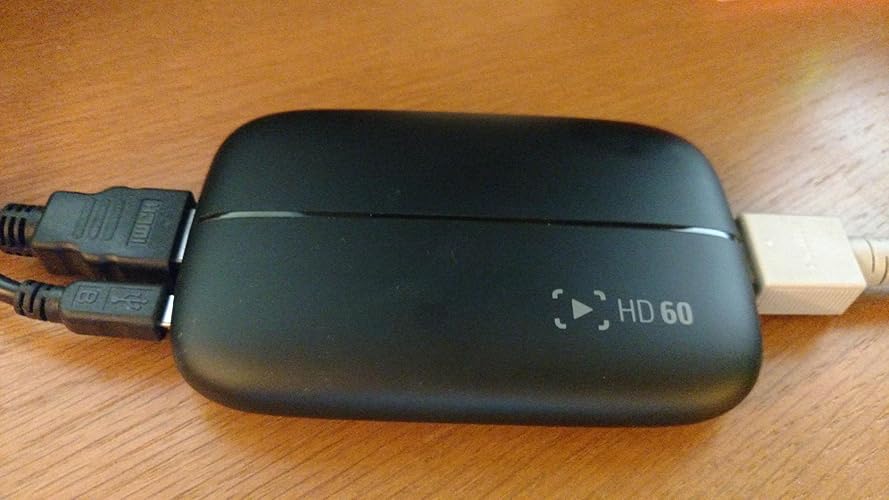
The Elgato Game Capture HD60 is a capture device that allows gamers to share their gaming experiences in high-definition with fellow enthusiasts. The Elgato HD60 captures gameplay with precision and clarity, ensuring that every detail is preserved for sharing and reliving. Its compatibility with streaming platforms enhances the user's connection with their audience, transforming ordinary gameplay into engaging live experiences. The device's user-friendly interface and intuitive controls make it accessible even for those new to game capture and streaming. The Elgato Game Capture HD60 is a bridge that connects gamers across the digital realm.
Customer Reviews & Ratings
3070 customers ratings
-
5 Star
73%
-
4 Star
14%
-
3 Star
8%
-
2 Star
1%
-
1 Star
4%
Review this product
Share your thoughts with other customers
Pros
- Captures gameplay with precision and clarity
- Connects with PlayStation 4, Xbox One, and other Consoles to ensure that gaming moments are shared in stunning HD quality
- Compatible with streaming platforms
- User-friendly interface and intuitive controls
Cons
- Latency issue when used for streaming
Product Price History
Important information
- Limitations : For products shipped internationally, please note that any manufacturer warranty may not be valid; manufacturer service options may not be available; product manuals, instructions, and safety warnings may not be in destination country languages; the products (and accompanying materials) may not be designed in accordance with destination country standards, specifications, and labeling requirements; and the products may not conform to destination country voltage and other electrical standards (requiring use of an adapter or converter if appropriate). The recipient is responsible for assuring that the product can be lawfully imported to the destination country. When ordering from Ubuy or its affiliates, the recipient is the importer of record and must comply with all laws and regulations of the destination country.
- Not all the products listed on Ubuy are for sale, as Ubuy is a global search engine. Products are subject to export/trade regulations.
NZD 482
Order now and get it around Sunday, July 05
This item is not restrict in my country.(Please click on above link if this item is not restrict in your country, So our team will review and allow.)
QTY:
Secured transaction
Ubuy works hard to protect your security and privacy. Our advanced payment security system ensures confidentiality by encrypting your information during transmission using AES (Advanced Encryption Standards) and SSL (Secure Socket Layer) protocols. Your payment details are 100% secure as we do not share your payment details with third party sellers.
Our Top Logistics Partners
Fastest cross-border delivery
Features & Benefits
- Record and stream gameplay in stunning 1080p with 60fps
- Access recordings seamlessly on PC or Mac
- Lag-free passthrough for uninterrupted gaming
- Built-in Live Streaming feature for easy set-up on Twitch, YouTube, or Ustream
- Add webcam, overlays, and change stream layout on-the-fly with Stream Command
- Voice commentary feature included