0 ratings

Item #:
13973709
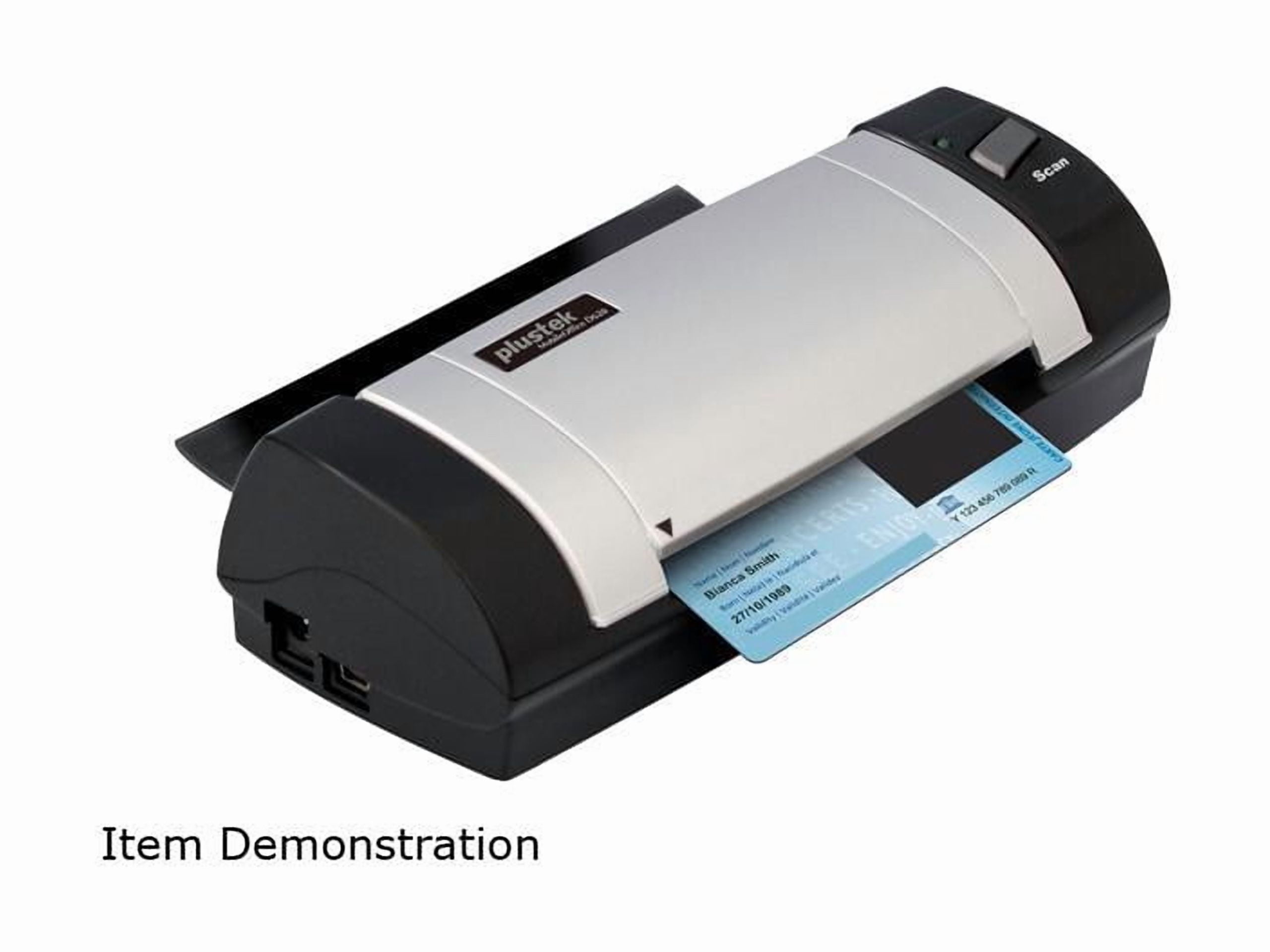
Plustek MobileOffice D620 600dpi Duplex Handheld Scanner - USB
Item #:
13973709
NZD 559
Price Details
Excluding Shipping & Custom charges ( Shipping and custom charges will be calculated on checkout )
*All items will import from US
Afterpay Information

Split your bill into 4 payments of NZD 139.75 interest-free
 Add the item to your cart
 Select Afterpay at checkout
 Fill in your details
 Complete your first payment
and pay the remaining in easy instalments or according to the payment plan you selected
Here’s why you should Afterpay it

Get everything you need now..
Shop thousands of brands and millions of products, online and in-store.

Pay over six weeks.
Make the first payment upfront and the rest over time. Always interest-free when you pay it in 4.

No fees when you pay on time.
We’ll send you reminders and cap late payments to help you get back on track.
(1) Terms and conditions. apply. (2) Installment Agreement. (3) Eligible for customers in. New Zealand, (4) Your final payment plan may vary depending on your credit history.
0 ratings
Write a review
In stock
 Imported from USA store
QTY:
Order now and get it around Thursday, August 27
Secured transaction
Ubuy works hard to protect your security and privacy. Our advanced payment security system ensures confidentiality by encrypting your information during transmission using AES (Advanced Encryption Standards) and SSL (Secure Socket Layer) protocols. Your payment details are 100% secure as we do not share your payment details with third party sellers.
Our Top Logistics Partners


Experience the convenience and mobility of handheld scanning on the go with the Plustek MobileOffice D620.

Buy Now Pay Later

Fast
Shipping

Free
Return*

Secure Packaging

100% Original Products

PCI DSS Compliance

ISO 27001 Certified


Note: Step Down Voltage Transformer required for using electronics products of US store (110-120). Recommended power converters Buy Now.


What Stands Out
Duplex Scanning
Effortlessly scan both sides of documents in one pass, reducing time and enhancing productivity for busy professionals needing efficiency without compromising quality.
Portable Design
Compact and lightweight, the MobileOffice D620 is ideal for on-the-go scanning, making it perfect for travelers and remote workers who require document management flexibility.
High Resolution
With a stunning 600dpi resolution, this scanner provides sharp and clear images, ensuring that every detail of your documents is captured with exceptional quality and precision.
Product Details
- USB-powered and compact design ideal for crowded registration, office desks, and mobile applications
- Scans both sides of cards up to 1.2 mm thick, including embossed cards, in as little as 7 seconds
- Compatible with industry standard TWAIN and WIA drivers for integration with scanning and imaging programs
- Includes ABBYY FineReader Sprint for easy creation of searchable PDFs
- Simple operation - load the card and press a button to automatically save scanned images and PDFs to any destination
- Contains chemicals known to the State of California to cause cancer and birth defects or other reproductive harm (California Proposition 65)
Who Should Buy?

-
Frequent Travelers
Ideal for professionals who need to scan documents on-the-go without carrying bulky equipment.
-
Small Businesses
Perfect for businesses that require quick and efficient document scanning for record-keeping and organization.
-
Students and Researchers
Useful for scanning notes, articles, or books for study purposes without damaging original materials.

-
High Volume Scanning
Not suitable for users needing to scan large volumes of documents quickly due to its slower scanning speed.
Product Description
Plustek MobileOffice D620 600dpi Duplex Handheld Scanner - USB
Have any Query? Chat with us
Product Buying Guide
The Plustek D620 Card & ID Scanner is a compact and efficient scanner that is perfect for individuals and businesses looking to easily scan and manage cards, IDs, and documents. With its USB-powered design and compatibility with various scanning programs, it offers convenience and versatility. In this buying guide, we will explore the product specifications, key features, usage scenarios, competitors, user reviews, price analysis, and buying considerations to help you make an informed decision.
Product Specifications
- Brand: Plustek
- Model: D620
- Scanner Type: Card & ID Scanner
- Color: Black & Blue
- Duplex Scanning: Yes
- Maximum Resolution: 600 dpi
- Maximum Document Size: 4.13 x 23.36 inches
- Minimum Document Size: 1.57 x 1.77 inches
- Compatibility: TWAIN and WIA drivers
- Included Software: ABBYY FineReader Sprint
Key Features
- Compact and lightweight design
- USB-powered for convenient use
- Scans both sides of cards up to 1.2 mm thick
- Scans paper documents of various sizes
- Compatible with thousands of scanning and imaging programs
- Includes ABBYY FineReader Sprint for creating searchable PDFs
- Easy to use with automatic image and PDF saving
Usage Scenarios
- Crowded registration desks
- Office desks with limited space
- Mobile applications for on-the-go scanning
- Businesses that frequently handle ID cards
- Personal use to digitize and store important cards
- Creating searchable PDFs for efficient document management
Usage Scenarios
- Epson DS-310
- Fujitsu ScanSnap S1300i
- Canon imageFORMULA P-215II
Some User Review
- The Plustek D620 scanner has been a game-changer for my small business. It's compact and fits perfectly on my crowded desk. The scanning speed is impressive, and the image quality is excellent.
- I love how easy it is to use this scanner. Just load the card and press a button. The scanned images are saved automatically, which saves me a lot of time.
- The compatibility with different scanning programs is a huge plus. I use it with the software I'm comfortable with and it works like a charm.
- I've been using the Plustek D620 for a few months now, and I haven't faced any issues so far. It's reliable and efficient.
- The inclusion of ABBYY FineReader Sprint software is a great value addition. I can easily create searchable PDFs for better document organization.
Competitors
- The Plustek D620 Card & ID Scanner is competitively priced compared to its competitors. Considering its features and performance, it offers excellent value for money.
- While the exact price may vary depending on the retailer and any ongoing promotions, it is advisable to compare prices from multiple sellers to ensure you get the best deal.
Buying Considerations
- Consider the size and weight of the scanner to ensure it fits your intended workspace.
- Evaluate your scanning needs and ensure the D620 meets your requirements in terms of document size and thickness.
- Check the compatibility with your existing scanning software to avoid any compatibility issues.
- Read customer reviews and consider the overall user satisfaction with the product.
- Compare prices from different retailers to find the best deal and take advantage of any ongoing promotions.
Conclusion
The Plustek D620 Card & ID Scanner is a reliable and efficient scanner that offers convenience and versatility. Its compact design, USB-powered operation, and compatibility with various scanning programs make it an excellent choice for individuals and businesses alike. With positive user reviews and a competitive price point, the D620 is a great investment for anyone in need of a high-quality card and ID scanner.
View LessThe Plustek D620 Card & ID Scanner is a compact and efficient scanner that is perfect for individuals and businesses looking to easily scan and manage cards, IDs, and documents. With its USB-powered design and compatibility with various scanning programs, it offers convenience and versatility. In this buying guide, we will explore the product specifications, key features, usage scenarios, competitors, user reviews, price analysis, and buying considerations to help you make an informed decision. Continue Reading
Customer Questions & Answers
-
Question:
What types of documents can the Plustek D620 scan?
Answer: It can scan paper documents, plastic cards, embossed cards, ID cards, and prescriptions. -
Question:
Is the scanner compatible with my computer?
Answer: Yes, it is compatible with most imaging applications using TWAIN and WIA drivers. -
Question:
How does the one-touch scanning feature work?
Answer: You can easily configure the one-touch scanning for document type and output location via DocAction.
Plustek Editorial Review
No editorial reviews found
Customer Reviews & Ratings
1 customers ratings
-
5 Star
100%
-
4 Star
0%
-
3 Star
0%
-
2 Star
0%
-
1 Star
0%
Review this product
Share your thoughts with other customers
Platform Trust & Buyer Confidence

RA
Ranee
Verified buyer
“Paint ordered from USA, u buy got the product to me in New Zealand in approx a week”
22 July 2026 · via Trustpilot
NC
NordVPN
Verified buyer
“very speedy delivery,tracking info was superb-best experikence ever!!!”
24 June 2026 · via Trustpilot
NH
Nicholas
Verified buyer
“Love what I received and ordered found that usa clothes are more better quality and look better than the same clothes in my country but are harder to find here recommend ubuy 100%”
22 June 2026 · via Trustpilot
D
Dneah
Verified buyer
“Product came earlier than expected (shipped from US to NZ), in about 3 weeks. No damages and product was exactly as advertised!”
15-Jul-26 · via Trustpilot
TS
Tania
Verified buyer
“Easy to order, easy to track and the product is great to use. Also, the person-to-person (not automated) phone call I got to confirm that I'd received the item was wonderful ??”
11-Jul-26 · via Trustpilot
Secure Checkout
Global Delivery
Easy Returns
Genuine Products
Product Price History
Important information
- Limitations : For products shipped internationally, please note that any manufacturer warranty may not be valid; manufacturer service options may not be available; product manuals, instructions, and safety warnings may not be in destination country languages; the products (and accompanying materials) may not be designed in accordance with destination country standards, specifications, and labeling requirements; and the products may not conform to destination country voltage and other electrical standards (requiring use of an adapter or converter if appropriate). The recipient is responsible for assuring that the product can be lawfully imported to the destination country. When ordering from Ubuy or its affiliates, the recipient is the importer of record and must comply with all laws and regulations of the destination country.
- Not all the products listed on Ubuy are for sale, as Ubuy is a global search engine. Products are subject to export/trade regulations.
NZD 559
Order now and get it around Thursday, August 27
This item is not restrict in my country.(Please click on above link if this item is not restrict in your country, So our team will review and allow.)
QTY:
Secured transaction
PCI DSS compliant and ISO 27001:2022 certified, with encrypted payments and full buyer protection on every order.
Our Top Logistics Partners
Fastest cross-border delivery
Features & Benefits
- Compact and lightweight design for easy travel.
- USB-powered, eliminating the need for additional power adapters.
- Scans various documents including ID cards and prescriptions into multiple digital formats.
- Compatible with industry-standard TWAIN and WIA drivers.
- Includes ABBYY FineReader Sprint for creating searchable PDFs.
- Eco-friendly with ENERGY STAR certification and low power usage.
Ubuy Assurance
Experience worry-free shopping with 100% original products, PCI DSS-compliant payment security, ISO 27001-certified data protection, the fastest cross-border delivery, free returns *, and secure packaging on every order.