0 ratings
genuine image
Microsoft Windows 11 Pro (USB)
Windows 11 Pro delivers a powerful, streamlined user experience that helps you stay focused and get more done – wherever your office might be.
Microsoft Windows 11 Pro (USB)
Item #: 49254555

Microsoft Windows 11 Pro (USB)

Item #: 49254555

NZD 471

Price Details

Excluding Shipping & Custom charges ( Shipping and custom charges will be calculated on checkout )

*All items will import from US

0 ratings Write a review
In stock
us Imported from USA store

QTY:

Order now and get it around Tuesday, July 07
Our Top Logistics Partners
  • fedex
  • dhl
Windows 11 Pro delivers a powerful, streamlined user experience that helps you stay focused and get more done – wherever your office might be.
U-Care Warranty:
None
Select a Plan
buy now pay later

Buy Now Pay Later

fast shipping

Fast
Shipping

free return

Free
Return*

secure packaging

Secure Packaging

100% original products

100% Original Products

pci-dss

PCI DSS Compliance

iso certified

ISO 27001 Certified


paypal payment
afterpay payment
visa payment
mastercard payment
Note: Step Down Voltage Transformer required for using electronics products of US store (110-120). Recommended power converters Buy Now.

What Stands Out

Enhanced Security
Windows 11 Pro offers advanced security features like BitLocker and Windows Defender, ensuring data protection and safe online experiences, surpassing basic versions and competitors in safeguarding sensitive information.
Improved Productivity
With features such as Snap layouts and virtual desktops, Windows 11 Pro enhances multitasking capabilities, streamlining user workflows and enabling better organization to maximize efficiency for professionals and businesses.
User-Friendly Interface
The modern, streamlined interface of Windows 11 Pro provides an intuitive user experience, making navigation smoother and attracting users seeking a contemporary computing environment compared to earlier versions and rival OS options.

Product Details

Shop Microsoft Windows 11 Pro (USB) online at a best price in New Zealand. B09V71FYGS
  • Windows 11 Pro USB for instant productivity and simpler UI
  • New features like snap layouts for managing multiple tasks
  • Effortless online meetings with content sharing and intelligent noise cancelling
  • Familiar deployment and update tools for consistent performance
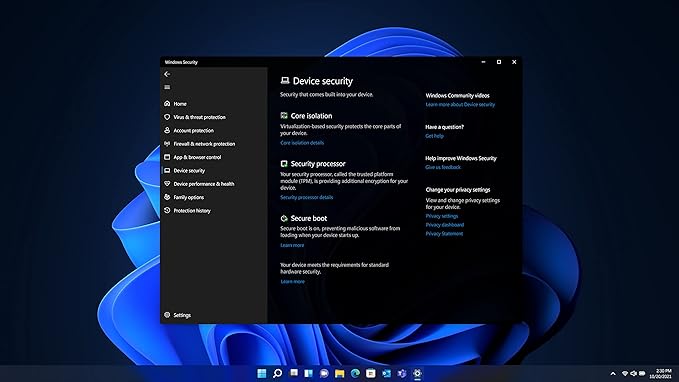
  • Powerful security with hardware-based isolation, encryption, and malware protection
  • Designed for hybrid work to deliver a streamlined user experience
Product Dimensions 5.8 x 4.5 x 0.8 inches (14.7 x 11.4 x 2 cm); 0.2 ounces (5.67 grams)
Item model number HAV-00162
Date First Available January 1, 2022
Manufacturer Microsoft Software
Package Weight1.27 Pound

Who Should Buy?

Suitable For
  • Business Professionals

    Ideal for business environments, offering advanced security features and performance enhancements to support productivity.

  • Gamers

    Includes optimization for gaming with DirectStorage and Auto HDR support, enhancing graphics and load times.

  • Developers

    Provides tools and features like Windows Subsystem for Linux, suitable for development and testing across platforms.

Not Suitable For
  • Casual Users

    Not ideal for basic users who need minimal features, as it may be overly complex and unnecessary.

  • Low-End PCs

    May not perform well on older hardware, as it requires more resources compared to previous Windows versions.

  • Non-Gamers

    Users not focused on gaming might not utilize many advanced features, making it an expensive choice for them.

Product Description

About This Item

Experience the power and innovation of the all-new Microsoft Windows 11 Pro. Designed specifically for today's modern professionals, this operating system is the ultimate solution for all your computing needs. With its fresh new look and enhanced features, Windows 11 Pro takes productivity and efficiency to a whole new level. Seamless performance and advanced security are the cornerstones of Windows 11 Pro.

Whether you're a business owner, a creative professional, or a student, you can rely on this robust operating system to provide a smooth and secure computing experience. Its cutting-edge technology and intelligent features will help you accomplish tasks faster and more effectively. One of the standout features of Windows 11 Pro is its user-friendly interface. The Start Menu has been redesigned, allowing you to access your favorite apps and documents with just a few clicks.

The new taskbar is customizable and offers a streamlined workspace, giving you quick access to the tools and programs you use most frequently. Enhanced collaboration is another highlight of Windows 11 Pro. With Microsoft Teams integrated directly into the operating system, you can effortlessly connect and communicate with colleagues and friends, making collaboration a breeze. Share files, participate in video conferences, and stay connected from anywhere in the world. Security is of utmost importance in today's digital landscape, and Windows 11 Pro delivers peace of mind with its advanced security features.

From secure boot to enhanced Windows Hello biometrics, your data and information are protected at every step. Windows 11 Pro also includes built-in antivirus and malware protection, ensuring that your device and files remain safe from threats. Experience the future of computing with Microsoft Windows 11 Pro. With its sleek design, powerful performance, and advanced features, this operating system is the perfect companion for professionals in any field.

Upgrade to Windows 11 Pro today and take your productivity to new heights.

Have any Query? Chat with us

Product Buying Guide

Windows 11 Pro USB is designed to offer a powerful, streamlined user experience for hybrid work, enabling users to stay focused and get more tasks done efficiently. With features like snap layouts, intelligent noise cancelling, and powerful security measures, this product aims to enhance productivity and collaboration for users in {{COUNTRY}}.

Product Specifications

  • Windows 11 Pro
  • USB
  • Simpler, more intuitive UI with effortless navigation
  • Effective online meetings, content sharing, and intelligent noise cancelling
  • Familiar deployment and update tools for accelerated adoption
  • Hardware-based isolation, encryption, and built-in malware protection

Key Features

  • Helps in managing multiple tasks with ease
  • Enables effective online meetings, content sharing, and intelligent noise cancelling
  • Accelerates adoption with expanded deployment policies
  • Safeguards data and access with hardware-based isolation, encryption, and malware protection

Usage Scenarios

  • Optimized for users working in a hybrid work environment, allowing them to stay focused and productive
  • Facilitates effective online meetings with seamless content sharing and intelligent noise cancelling
  • Helps users manage multiple tasks efficiently with snap layouts

Usage Scenarios

  • Windows 11 Home
  • Apple macOS

Some User Review

  • Windows 11 Pro USB has significantly improved my productivity in managing multiple tasks with the snap layouts feature. The collaboration tools are effective for seamless online meetings and content sharing.
  • The security measures built into Windows 11 Pro USB provide peace of mind when accessing data from various locations. The deployment tools have also made the adoption process much smoother.

Competitors

  • The price falls within an average range for similar products in the market, offering good value for the features and security measures provided.

Buying Considerations

  • If you are working in a hybrid work environment and require efficient task management and collaboration tools, Windows 11 Pro USB is well-suited for your needs.
  • For users who prioritize data security and need hardware-based isolation, encryption, and built-in malware protection, this product offers robust security measures.

Conclusion

With its focus on enhancing productivity, collaboration, and security, Windows 11 Pro USB is a valuable choice for users in {{COUNTRY}} who seek a streamlined user experience for their hybrid work environment.

View Less

Windows 11 Pro USB is designed to offer a powerful, streamlined user experience for hybrid work, enabling users to stay focused and get more tasks done efficiently. With features like snap layouts, intelligent noise cancelling, and powerful security measures, this product aims to enhance productivity and collaboration for users in {{COUNTRY}}. Continue Reading

Customer Questions & Answers

  • Question: What are the key features of Microsoft Windows 11 Pro?

    Answer: Microsoft Windows 11 Pro offers an enhanced user interface, improved multitasking through Snap Layouts, and integrated Microsoft Teams for seamless communication. Additionally, it includes advanced virtualization capabilities and enhanced security features like BitLocker. These enhancements provide a more fluid and productive experience for both personal and professional use, making it ideal for remote work, creative tasks, and intensive gaming.
  • Question: How does Windows 11 Pro differ from Windows 11 Home?

    Answer: Windows 11 Pro includes features not available in the Home version, such as BitLocker encryption, Group Policy management, and the ability to join a domain. These functionalities make it especially suitable for business environments where security and management capabilities are paramount, thus ensuring data protection and administrative control over multiple devices.
  • Question: Is Microsoft Windows 11 Pro suitable for gaming?

    Answer: Yes, Microsoft Windows 11 Pro is very much suited for gaming. It incorporates support for DirectStorage technology and enhanced graphics performance, providing faster load times and better frame rates. This makes it an excellent choice for gamers looking to maximize their gaming experience on the latest titles, particularly those that demand high-performance hardware.
  • Question: Can you upgrade from Windows 10 to Windows 11 Pro?

    Answer: Absolutely, if your device meets the minimum system requirements, you can upgrade from Windows 10 to Windows 11 Pro. Users can initiate the upgrade process via Windows Update or through Microsoft's dedicated upgrade tool. This is a great way to access the latest features without the need for a complete reinstallation.
  • Question: What are the system requirements for Windows 11 Pro?

    Answer: To install Windows 11 Pro, your system must meet specific requirements: a compatible 64-bit processor, 4GB of RAM, and 64GB of storage, alongside a DirectX 12 compatible graphics card. Additionally, features like TPM 2.0 and Secure Boot are necessary for enhanced security. Ensuring your hardware meets these requirements will facilitate a smooth installation and optimal performance.
  • Question: Does Windows 11 Pro support touch-screen devices?

    Answer: Yes, Windows 11 Pro fully supports touch-screen devices, offering a more intuitive way to interact with your system. The operating system features a redesigned interface that is optimized for touch input, making it ideal for tablets and 2-in-1 laptops. This is particularly useful for designers and professionals who benefit from a touch-centric workflow.
  • Question: What is the licensing model for Windows 11 Pro?

    Answer: Windows 11 Pro typically requires a one-time purchase for licensing. This license covers the use of the software on a single device and includes access to updates and features. Organizations often prefer this model as it allows for comprehensive control over their computer systems, ensuring all devices are running the same approved software.
  • Question: How can I activate Windows 11 Pro?

    Answer: Once installed, Windows 11 Pro can be activated by entering a valid product key during setup or later through the system settings. Accessing 'Activation' in the settings allows you to input the key. Activation is essential for enjoying full access to updates and support, making this process crucial for maintaining your system’s functionality.
  • Question: What productivity features are included in Windows 11 Pro?

    Answer: Windows 11 Pro includes several productivity-enhancing features like Snap Layouts for organized window management, Virtual Desktops for managing different workflows, and Widgets for personalized information at a glance. These tools help users streamline their tasks, making it easier to switch between projects, which enhances overall productivity, especially for professionals.
  • Question: Where can I buy Microsoft Windows 11 Pro USB in New Zealand?

    Answer: You can purchase Microsoft Windows 11 Pro USB at Ubuy. They offer a variety of options, ensuring you can find the right edition based on your requirements. Ubuy's platform is user-friendly and provides helpful customer support to guide you through your purchase, making it a reliable choice for acquiring software.

Microsoft Microsoft HAV-00162 Editorial Review

This is a retail version of Windows 11 Pro that comes on a USB drive. It can be used on a newly built PC or one that already has an OS installed. The activation key is for use on one computer only. The USB drive may be able to install Windows 11 on multiple computers if you have multiple activation keys. The OS is 64-bit and there are no OEM versions as this is a retail package. The installation process is straightforward, but it is recommended that users look up instructions before proceeding. One customer received a scratched USB drive with an unsealed package, but others found the installation process easy. Some users were not pleased with the new design changes and wanted the classic Windows look. Others expressed disappointment that Windows 11 pro is just an upgrade from Windows 11 Home and cannot be installed on a computer without an OS. Some customers also felt that the price of the product was too high and that there was too much bloatware and spyware installed. However, most customers who purchased this product did not have any major issues and were satisfied with their purchase.

Customer Reviews & Ratings

4.2
432 customers ratings
  • 5 Star
    70%
  • 4 Star
    10%
  • 3 Star
    6%
  • 2 Star
    2%
  • 1 Star
    12%

Review this product

Share your thoughts with other customers

Pros

  • Straightforward installation process
  • Retail package (no OEM versions)
  • Built-in system check to determine if requirements are met
  • USB drive for pristine install

Cons

  • High price

Product Price History

Important information

  • Limitations : For products shipped internationally, please note that any manufacturer warranty may not be valid; manufacturer service options may not be available; product manuals, instructions, and safety warnings may not be in destination country languages; the products (and accompanying materials) may not be designed in accordance with destination country standards, specifications, and labeling requirements; and the products may not conform to destination country voltage and other electrical standards (requiring use of an adapter or converter if appropriate). The recipient is responsible for assuring that the product can be lawfully imported to the destination country. When ordering from Ubuy or its affiliates, the recipient is the importer of record and must comply with all laws and regulations of the destination country.
  • Not all the products listed on Ubuy are for sale, as Ubuy is a global search engine. Products are subject to export/trade regulations.