0 ratings


Item #:
59914905
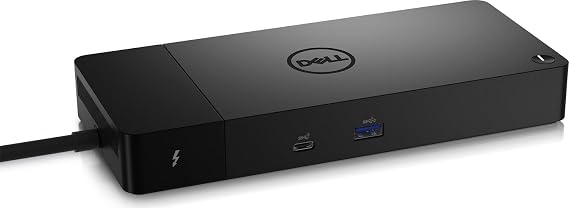
Dell ThunderBolt 4 Dock (WD22TB4), Black
77% of respondents would recommend this to a friend
Item #:
59914905
NZD 359
Price Details
Excluding Shipping & Custom charges ( Shipping and custom charges will be calculated on checkout )
*All items will import from US
Afterpay Information

Split your bill into 4 payments of NZD 89.75 interest-free
 Add the item to your cart
 Select Afterpay at checkout
 Fill in your details
 Complete your first payment
and pay the remaining in easy instalments or according to the payment plan you selected
Here’s why you should Afterpay it

Get everything you need now..
Shop thousands of brands and millions of products, online and in-store.

Pay over six weeks.
Make the first payment upfront and the rest over time. Always interest-free when you pay it in 4.

No fees when you pay on time.
We’ll send you reminders and cap late payments to help you get back on track.
(1) Terms and conditions. apply. (2) Installment Agreement. (3) Eligible for customers in. New Zealand, (4) Your final payment plan may vary depending on your credit history.
In stock
 Imported from USA store
QTY:
Only 9 items left in stock.
Order now and get it around Tuesday, September 08
Secured transaction
Ubuy works hard to protect your security and privacy. Our advanced payment security system ensures confidentiality by encrypting your information during transmission using AES (Advanced Encryption Standards) and SSL (Secure Socket Layer) protocols. Your payment details are 100% secure as we do not share your payment details with third party sellers.
Our Top Logistics Partners


Multiply Productivity: Connect displays and peripherals to your system with a single cable for ultimate productivity.

Buy Now Pay Later

Fast
Shipping

Free
Return*

Secure Packaging

100% Original Products

PCI DSS Compliance

ISO 27001 Certified




Note: Step Down Voltage Transformer required for using electronics products of US store (110-120). Recommended power converters Buy Now.


What Stands Out
Versatile Connectivity
Offers multiple ports including USB-C, HDMI, and Ethernet, allowing users to connect various devices effortlessly, enhancing productivity for professionals needing extensive connectivity in one dock.
Fast Charging Capability
Delivers up to 90W power delivery for quick device charging, ensuring you stay powered throughout the day without needing multiple adapters, ideal for active users on the go.
Compact Design
Sleek, space-efficient design fits seamlessly in any workspace, providing users with a clutter-free environment while maintaining high functionality, perfect for home and office settings.
Product Details
| Hardware Interface | Thunderbolt 4 |
| Compatible Devices | Dell, HDMI, Thunderbolt, USB C, Windows 10 |
| Total Usb Ports | 7 |
| Number of Ports | 11 |
| Total Number of HDMI Ports | 1 |
| Wattage | 180 watts |
| Input Voltage | 230 volts_of_alternating_current |
| Minimum Required Operating System Version | Windows 11 |
| Item Dimensions L x W x H | 9.7"L x 6.5"W x 1.1"H (24.6 x 16.5 x 2.8 cm) |
| Item Weight | 650 g |
| Color | Black |
| Brand | Dell |
| Number of Items | 1 |
| Number of Packs | 1 |
| Global Trade Identification Number | 05397184635629, 05397184718902 |
| Manufacturer | Dell Computers |
| Item Type Name | Doking Station |
| Model Number | DELL-WD22TB4 |
| Mfr Part Number | DELL-WD22TB4 |
| Total USB Ports | 7 |
| Product Dimensions (L x W x H) | 9.7"L x 6.5"W x 1.1"H (24.6 x 16.5 x 2.8 cm) |
| Total HDMI Ports | 1 |
Who Should Buy?

-
Business Professionals
Ideal for professionals needing multiple connections for laptops to boost productivity with docking and charging capabilities.
-
Content Creators
Great for video editors and designers who require high-speed data transfer and support for multiple high-resolution displays.
-
Remote Workers
Perfect for remote employees who need a versatile docking solution for seamless connectivity to various peripherals at home.

-
Casual Users
Individuals who simply use laptops for basic tasks may find the dock excessively advanced and overpriced for their needs.
Product Description
Have any Query? Chat with us
Customer Questions & Answers
-
Question:
What devices are compatible with the Dell ThunderBolt 4 Dock WD22TB4?
Answer: The Dell ThunderBolt 4 Dock WD22TB4 is designed to work with Thunderbolt 4 and USB-C compatible laptops, including models from major brands like Dell, HP, and Lenovo. Additionally, it offers backward compatibility with Thunderbolt 3 devices and USB-C peripherals. This dock is ideal for users who require a versatile hub to connect multiple monitors, external storage, and other peripherals, making it perfect for home office setups or professional workstations. -
Question:
How many displays can I connect to the Dell ThunderBolt 4 Dock WD22TB4?
Answer: You can connect up to two 4K displays at 60Hz or a single 8K display at 30Hz using the Dell ThunderBolt 4 Dock WD22TB4. This capability makes it a robust choice for graphic designers, video editors, and multitaskers who rely on high-resolution displays for productivity. Whether you're managing multiple applications for work or enjoying a cinematic experience at home, this dock provides the required video output versatility. -
Question:
Does the Dell ThunderBolt 4 Dock WD22TB4 support power delivery?
Answer: Yes, the Dell ThunderBolt 4 Dock WD22TB4 supports power delivery, allowing you to power your compatible laptop while simultaneously connecting peripherals. With up to 90W power delivery, you can keep your device charged during heavy usage, making it perfect for professionals who need to maintain productivity throughout the day. This feature also reduces cable clutter on your desk since you won't need a separate charger for your laptop. -
Question:
Can the Dell ThunderBolt 4 Dock WD22TB4 be used with non-Dell devices?
Answer: Absolutely! While the dock is optimized for Dell laptops, it is compatible with any Thunderbolt 4 or USB-C device from other manufacturers. This flexibility allows users of various brands to benefit from its extensive connectivity options, including power delivery and multi-display support. It’s an excellent investment for users who own multiple devices or are frequently upgrading their laptops. -
Question:
What ports does the Dell ThunderBolt 4 Dock WD22TB4 feature?
Answer: The Dell ThunderBolt 4 Dock WD22TB4 includes a wide range of ports: dual Thunderbolt 4 ports, USB-A 3.2 Gen 2, USB-C, an HDMI 2.0, Ethernet, and a 3.5mm audio jack. This diverse array of connectivity options is designed to support multiple peripherals simultaneously, making it ideal for users who need greater connectivity without sacrificing performance. Whether you're connecting external hard drives or an array of input devices, this dock has you covered. -
Question:
Is the Dell ThunderBolt 4 Dock WD22TB4 compatible with Mac systems?
Answer: Yes, the Dell ThunderBolt 4 Dock WD22TB4 is compatible with Mac systems that support Thunderbolt 3 or 4. Mac users can enjoy high-speed data transfer, video output, and charging capabilities with this dock. This makes it particularly beneficial for creative professionals using macOS who seek to enhance their workspace with multiple displays and peripherals. -
Question:
What are the dimensions and weight of the Dell ThunderBolt 4 Dock WD22TB4?
Answer: The Dell ThunderBolt 4 Dock WD22TB4 has compact dimensions, making it an ideal addition to any workspace. It weighs approximately 1.5 kg, making it portable enough to carry for on-the-go professionals. The sleek design ensures that it fits seamlessly into both home and office environments, allowing users to maintain a tidy workspace while maximizing connectivity and functionality. -
Question:
How does the Dell ThunderBolt 4 Dock WD22TB4 improve productivity?
Answer: The Dell ThunderBolt 4 Dock WD22TB4 enhances productivity by allowing users to connect multiple devices easily, reducing cable clutter while providing power delivery to your laptop. With its ability to support dual 4K monitors, users can multitask efficiently, whether it’s for presentations, coding, or graphic design. The dock serves as a central hub, streamlining workflow for busy professionals. -
Question:
What cooling features are available with the Dell ThunderBolt 4 Dock WD22TB4?
Answer: The Dell ThunderBolt 4 Dock WD22TB4 is designed with effective ventilation systems to prevent overheating during prolonged use. It is built to dissipate heat efficiently even when supporting high data transfer rates or powering multiple devices simultaneously. This ensures peak performance without interruptions, providing reliability for users who depend on the dock during intense work sessions. -
Question:
Where can I buy Dell ThunderBolt 4 Dock WD22TB4 in New Zealand?
Answer: You can buy the Dell ThunderBolt 4 Dock WD22TB4 at Ubuy. They offer a great selection of technology products, including this dock, ensuring that you can find the right solution for your connectivity needs. Ubuy provides a user-friendly shopping experience, allowing you to compare features and read customer reviews before making a decision.
Dell Docking Stations DELL-WD22TB4 Editorial Review


Dell ThunderBolt 4 Dock (WD22TB4), Black is a powerful docking station designed to enhance connectivity for Dell laptops and other compatible devices. With a total of 11 ports, including 7 USB ports and 1 HDMI port, it supports running dual monitors and provides fast charging capabilities. Users have appreciated its ability to connect multiple devices seamlessly, running a portable office from anywhere. However, some customers have experienced issues with used units being sold as new and noted that it lacks sufficient USB-A ports. It's essential to ensure compatibility, particularly that your laptop supports Thunderbolt 3 or 4 for optimal performance.
Customer Reviews & Ratings
458 customers ratings
-
5 Star
57%
-
4 Star
10%
-
3 Star
7%
-
2 Star
4%
-
1 Star
22%
Review this product
Share your thoughts with other customers
Pros
- Supports dual monitors effortlessly
- Seamless connectivity for multiple devices
- Fast charging capabilities for laptops
- Compact design with lightweight build
- Compatible with a variety of devices
Cons
- Limited USB-A ports may require additional adapters
Platform Trust & Buyer Confidence

RA
Ranee
Verified buyer
“Paint ordered from USA, u buy got the product to me in New Zealand in approx a week”
22 July 2026 · via Trustpilot
NC
NordVPN
Verified buyer
“very speedy delivery,tracking info was superb-best experikence ever!!!”
24 June 2026 · via Trustpilot
NH
Nicholas
Verified buyer
“Love what I received and ordered found that usa clothes are more better quality and look better than the same clothes in my country but are harder to find here recommend ubuy 100%”
22 June 2026 · via Trustpilot
D
Dneah
Verified buyer
“Product came earlier than expected (shipped from US to NZ), in about 3 weeks. No damages and product was exactly as advertised!”
15-Jul-26 · via Trustpilot
TS
Tania
Verified buyer
“Easy to order, easy to track and the product is great to use. Also, the person-to-person (not automated) phone call I got to confirm that I'd received the item was wonderful ??”
11-Jul-26 · via Trustpilot
Secure Checkout
Global Delivery
Easy Returns
Genuine Products
Product Price History
Important information
- Limitations : For products shipped internationally, please note that any manufacturer warranty may not be valid; manufacturer service options may not be available; product manuals, instructions, and safety warnings may not be in destination country languages; the products (and accompanying materials) may not be designed in accordance with destination country standards, specifications, and labeling requirements; and the products may not conform to destination country voltage and other electrical standards (requiring use of an adapter or converter if appropriate). The recipient is responsible for assuring that the product can be lawfully imported to the destination country. When ordering from Ubuy or its affiliates, the recipient is the importer of record and must comply with all laws and regulations of the destination country.
- Not all the products listed on Ubuy are for sale, as Ubuy is a global search engine. Products are subject to export/trade regulations.
NZD 359
Order now and get it around Tuesday, September 08
This item is not restrict in my country.(Please click on above link if this item is not restrict in your country, So our team will review and allow.)
QTY:
Only 9 items left in stock.
Secured transaction
PCI DSS compliant and ISO 27001:2022 certified, with encrypted payments and full buyer protection on every order.
Our Top Logistics Partners
Fastest cross-border delivery
Features & Benefits
- Modular design for easy upgrades with swappable modules.
- Features 2 x Thunderbolt-4 ports for high connectivity.
- Fast charging technology with SuperBoost capabilities.
- Supports multiple 4K displays and Thunderbolt peripherals.
- Data transfer speeds up to 40 GB/s for maximum efficiency.
- Compatible with Windows 10 and Windows 11 systems.
Ubuy Assurance
Experience worry-free shopping with 100% original products, PCI DSS-compliant payment security, ISO 27001-certified data protection, the fastest cross-border delivery, free returns *, and secure packaging on every order.