
- Home Page /
- Office Products /
- Office Electronics /
- Presentation Products /
- Electronic White Boards /
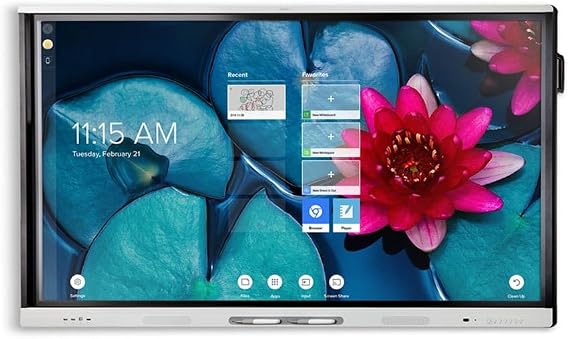
- SMART, Multi-Touch Smart Board 65 Interactive...
SMART, Multi-Touch Smart Board 65 Interactive Board Flat Panel for Classroom; Meeting and collaborative presentations.
NZD 4840
Price Details
Excluding Shipping & Custom charges ( Shipping and custom charges will be calculated on checkout )
*All items will import from US
Afterpay Information
Add the item to your cart
Select Afterpay at checkout
Fill in your details
Complete your first payment
and pay the remaining in easy instalments or according to the payment plan you selected
(1) Terms and conditions. apply. (2) Installment Agreement. (3) Eligible for customers in. New Zealand, (4) Your final payment plan may vary depending on your credit history.
QTY:
Ubuy works hard to protect your security and privacy. Our advanced payment security system ensures confidentiality by encrypting your information during transmission using AES (Advanced Encryption Standards) and SSL (Secure Socket Layer) protocols. Your payment details are 100% secure as we do not share your payment details with third party sellers.
The SMART Board 4065 interactive flat panel delivers an unparalleled viewing and writing experience with eight simultaneous touch points, perfect for collaborative presentations.
Buy Now Pay Later
Fast
Shipping
Free
Return*
Secure Packaging
100% Original Products
PCI DSS Compliance
ISO 27001 Certified
What Stands Out
Product Details
| Item Weight | 64 lbs (29.03 kg) |
Who Should Buy?
-
Educators
Ideal for teachers to enhance interactive learning and engagement with students through collaborative activities and presentations.
-
Corporate Meetings
Great for businesses needing collaborative discussion tools, enabling visual presentations and interactive brainstorming sessions among teams.
-
Training Sessions
Perfect for trainers who seek to involve participants actively, making training sessions more engaging and effective with visual tools.
-
Budget-Conscious Users
Not suitable for individuals or institutions with limited budgets, as it may be too expensive compared to simpler alternatives.
-
Casual Users
Not ideal for casual users who require basic display functions; the technology may be excessive for simple needs.
-
Small Spaces
Not recommended for users with limited space, as the 65-inch screen may dominate smaller rooms and create viewing challenges.
Product Description
SMART, Multi-Touch Smart Board 65 Interactive Board Flat Panel for Classroom; Meeting and collaborative presentations.
Customer Questions & Answers
-
Question:
What is a Multi-Touch Smart Board 65 Interactive Board?
Answer: A Multi-Touch Smart Board 65 is an interactive flat panel display designed for educational and professional environments. It allows multiple users to interact simultaneously with the screen, enabling collaborative activities. The device typically features high-resolution visuals, integrated software for presentations, and connectivity options for various devices, making it ideal for classrooms and meeting rooms. For instance, educators can use it for interactive lessons, while businesses may employ it for collaborative brainstorming sessions. -
Question:
How does the Multi-Touch feature enhance learning and presentations?
Answer: The Multi-Touch feature allows several users to interact with the Smart Board at the same time, promoting collaboration and engagement. This interaction enhances the learning experience as students can work together on projects, solve problems, and share ideas in real time. Likewise, presenters can involve audience participation during meetings, creating a more dynamic and interactive atmosphere. For example, in a classroom, students can maneuver objects on the board while discussing, making lessons more immersive. -
Question:
Can the Smart Board connect to other devices?
Answer: Yes, the Multi-Touch Smart Board 65 can connect to various devices such as laptops, tablets, and smartphones via USB, HDMI, or wireless connections. This connectivity allows users to share content seamlessly, making it easy to display presentations, videos, or educational materials from different devices. For instance, during a meeting, a presenter can connect their laptop to display a presentation directly on the Smart Board, encouraging participation and discussion among attendees. -
Question:
Is the Smart Board suitable for different age groups?
Answer: Absolutely. The Multi-Touch Smart Board 65 is versatile and can be used across different age groups, from kindergarten students to corporate professionals. Its interactive features make it particularly beneficial for educational environments, where young learners can engage in hands-on activities. In corporate settings, it facilitates collaboration and communication among team members. For example, teachers can use it for storytelling sessions, while business teams can brainstorm or plan projects effectively. -
Question:
What types of software are compatible with the Multi-Touch Smart Board?
Answer: The Multi-Touch Smart Board 65 is typically compatible with various educational and presentation software options, including Microsoft Office Suite, Google Workspace, and interactive teaching tools like SMART Learning Suite. These programs enhance functionality, allowing users to create engaging presentations, conduct quizzes, and incorporate multimedia elements into their lessons or meetings. For instance, educators can utilize software designed for interactive lessons, while businesses might choose presentation tools for effective information delivery. -
Question:
How durable is the display screen of the Smart Board?
Answer: The screen of the Multi-Touch Smart Board 65 is designed for durability and heavy use. It often features a scratch-resistant surface that can withstand frequent touch interactions and writing. This resilience ensures longevity, making it ideal for classrooms and meeting rooms where it may be used daily. For example, teachers can confidently allow students to engage with the board using markers, knowing that the integrity of the screen will be maintained. -
Question:
What additional accessories are recommended with the Smart Board?
Answer: To maximize the functionality of the Multi-Touch Smart Board, various accessories are recommended, such as styluses for writing, interactive pens, and a compatible sound system for presentations. Additionally, wall mounts or trolleys can enhance flexibility in positioning the board within different environments. These accessories can facilitate a more seamless interaction with the board, making collaborative sessions and presentations smoother and more engaging, whether in a school or office setting. -
Question:
Can the Smart Board be used for remote learning or meetings?
Answer: Yes, the Multi-Touch Smart Board 65 can be effectively used for remote learning and meetings. With its ability to connect to videoconferencing tools like Zoom or Microsoft Teams, it enables participation from remote users, allowing them to engage with content on the board. This feature is particularly beneficial for hybrid learning environments where some students may be present physically while others participate online, ensuring a cohesive learning experience. -
Question:
How does the Multi-Touch technology work?
Answer: The Multi-Touch technology in the Smart Board utilizes infrared and capacitive touch sensors to detect multiple points of contact. This enables various users to interact with the board simultaneously, allowing for gestures like pinching, tapping, and swiping. This technology enhances the interactive experience, giving users the ability to manipulate digital objects fluidly. For instance, during a group project, students can work together directly on the screen, fostering teamwork. -
Question:
Where can I buy the Multi-Touch Smart Board 65 Interactive Board in New Zealand?
Answer: You can buy the Multi-Touch Smart Board 65 Interactive Board at Ubuy in New Zealand. Ubuy offers a wide selection of interactive educational tools, ensuring you find the right board for complete classroom and collaborative presentation needs. By shopping on Ubuy, you can enjoy a streamlined shopping experience tailored to your specific requirements, making it convenient for both educational institutions and businesses.
SmartiCards Electronic White Boards Editorial Review
Customer Reviews & Ratings
-
5 Star
0%
-
4 Star
100%
-
3 Star
0%
-
2 Star
0%
-
1 Star
0%
Review this product
Share your thoughts with other customers
Product Price History
Important information
- Limitations : For products shipped internationally, please note that any manufacturer warranty may not be valid; manufacturer service options may not be available; product manuals, instructions, and safety warnings may not be in destination country languages; the products (and accompanying materials) may not be designed in accordance with destination country standards, specifications, and labeling requirements; and the products may not conform to destination country voltage and other electrical standards (requiring use of an adapter or converter if appropriate). The recipient is responsible for assuring that the product can be lawfully imported to the destination country. When ordering from Ubuy or its affiliates, the recipient is the importer of record and must comply with all laws and regulations of the destination country.
- Not all the products listed on Ubuy are for sale, as Ubuy is a global search engine. Products are subject to export/trade regulations.
NZD 4840
Order now and get it around Wednesday, July 22
This item is not restrict in my country.(Please click on above link if this item is not restrict in your country, So our team will review and allow.)
QTY:
Ubuy works hard to protect your security and privacy. Our advanced payment security system ensures confidentiality by encrypting your information during transmission using AES (Advanced Encryption Standards) and SSL (Secure Socket Layer) protocols. Your payment details are 100% secure as we do not share your payment details with third party sellers.
Features & Benefits
- 65-inch high-definition interactive flat panel for classrooms and meetings.
- Designed for collaborative presentations with seamless touch experience.
- Low-friction coated glass enables smooth finger glide for natural interaction.
- Minimizes glare for optimal viewing from any angle.
- Supports eight simultaneous touch points for multiple users.
- Compatible with SMART Notebook software for enhanced collaborative learning.