- Home Page /
- Electronics /
- Computer Accessories /
- Computer Accessories & Peripherals /
- Keyboards, Mice & Accessories /
- Mice /
- Logitech MX Master 4 Ergonomic Wireless Mouse...
0 ratings


Item #:
181534424
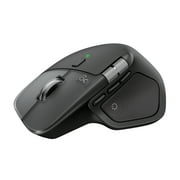
Logitech MX Master 4 Ergonomic Wireless Mouse with Haptics - Pale Gray | Advanced performance haptic feedback, Ultra-Fast Scrolling, 8K DPI
87% of respondents would recommend this to a friend
Item #:
181534424
NZD 273
Price Details
Excluding Shipping & Custom charges ( Shipping and custom charges will be calculated on checkout )
*All items will import from US
Afterpay Information

Split your bill into 4 payments of NZD 68.25 interest-free
 Add the item to your cart
 Select Afterpay at checkout
 Fill in your details
 Complete your first payment
and pay the remaining in easy instalments or according to the payment plan you selected
Here’s why you should Afterpay it

Get everything you need now..
Shop thousands of brands and millions of products, online and in-store.

Pay over six weeks.
Make the first payment upfront and the rest over time. Always interest-free when you pay it in 4.

No fees when you pay on time.
We’ll send you reminders and cap late payments to help you get back on track.
(1) Terms and conditions. apply. (2) Installment Agreement. (3) Eligible for customers in. New Zealand, (4) Your final payment plan may vary depending on your credit history.
0 ratings
Write a review
In stock
 Imported from USA store
QTY:
Order now and get it around Saturday, August 29
Secured transaction
Ubuy works hard to protect your security and privacy. Our advanced payment security system ensures confidentiality by encrypting your information during transmission using AES (Advanced Encryption Standards) and SSL (Secure Socket Layer) protocols. Your payment details are 100% secure as we do not share your payment details with third party sellers.
Our Top Logistics Partners


Experience haptic feedback on specific actions, shortcuts, notifications like switching desktops, slider adjustments and more.

Buy Now Pay Later

Fast
Shipping

Free
Return*

Secure Packaging

100% Original Products

PCI DSS Compliance

ISO 27001 Certified




Note: Step Down Voltage Transformer required for using electronics products of US store (110-120). Recommended power converters Buy Now.


What Stands Out
Ergonomic Design
The MX Master 4 features an ergonomic shape designed for comfort during long work sessions, reducing strain on the hand and wrist, ideal for professionals and gamers alike.
Haptic Feedback
Experience enhanced interaction with haptic feedback in the MX Master 4, providing precise sensory feedback during use, offering a premium feel for productivity and efficiency.
Multi-Device Connectivity
Seamlessly switch between devices using Bluetooth or USB-C connections with MX Keys S, enhancing versatility for users working across multiple platforms including Windows, Mac, and Linux.
Product Details
| Connectivity Technology | Bluetooth, Radio Frequency, USB |
| Additional Features | Lightweight, Programmable Buttons, Rechargeable, Soundless, Wireless |
| Movement Detection | Optical |
| Button Quantity | 7 |
| Hand Orientation | Right |
| Compatible Devices | Laptop, Personal Computer |
| Operating System | Android, Chrome OS, Linux, Windows, iPadOS, macOS |
| Battery Average Life | 70 days |
| Number of Batteries | 1 Nonstandard Battery batteries required. (included) |
| Hardware Platform | Mac, PC |
| Power Source | Battery Powered |
| Mouse Maximum Sensitivity | 8000 dots_per_inch (20320 cm) |
| Minimum Required Operating System Version | ChromeOS 137, Mac OS 14 Sonoma, Windows 11 |
| Embellishment Feature | LED |
| Range | 10 |
| Item Dimensions L x W | 6.6"L x 5.6"W (16.8 cm) |
| Unit Count | 1 Count |
| Enclosure Material | Plastic |
| Finish | Matte |
| Brand | Logitech |
| Model Name | Logitech MX Master 4 |
| Antenna Location | Education, Gaming, Home, Office, Personal |
| Model Number | 910-007559 |
| Included Components | Logitech MX Master 4 Mouse, User Documentation |
| Manufacturer | Logitech |
| UPC | 097855207579 |
| Global Trade Identification Number | 00097855207579 |
| Mfr Part Number | 910-007559 |
| Color | Pale Gray |
| Style Name | Ergonomic |
| Pattern | Mouse |
| Special Feature | Lightweight, Programmable Buttons, Rechargeable, Soundless, Wireless |
| Movement Detection Technology | Optical |
| Package Weight | 1.5 Pound (680 grams) |
Who Should Buy?

-
Remote Workers
Ideal for remote professionals needing comfort and precision during long work sessions with ergonomic design and haptic feedback.
-
Creative Professionals
Excellent choice for designers and artists who benefit from customizable features and the precision of the MX Master 4.
-
Multitaskers
Great for users who switch between devices; features allow seamless switching between computers and enhanced productivity.

-
Casual Users
Not necessary for users with basic computing needs; simpler and cheaper options may suffice for occasional tasks.
Product Description
Logitech MX Master 4 Ergonomic Wireless Mouse with Haptics - Pale Gray | Advanced performance haptic feedback, Ultra-Fast Scrolling, 8K DPI Any-surface, Quiet Clicks, Windows/MacOS, Wireless, USB-C
Have any Query? Chat with us
Related Searches
Customer Questions & Answers
-
Question:
What makes the Logitech MX Master 4 ergonomic?
Answer: The Logitech MX Master 4 is designed with an advanced ergonomic shape that supports a natural hand position, reducing strain during prolonged use. Its contours fit the palm for optimal comfort, allowing for extended usage without discomfort. This is especially beneficial for professionals who spend hours on design work, programming, or general computing. The thumb rest and strategically placed buttons enhance usability, making it ideal for multitasking and improving productivity. -
Question:
How does the advanced haptic feedback work on the Logitech MX Master 4?
Answer: The advanced haptic feedback feature in the Logitech MX Master 4 provides tactile responses during scrolling and clicking, creating a more immersive experience. This technology allows users to feel distinct feedback while navigating through long documents or web pages, improving precision. It is particularly useful in tasks that require careful selection or scrolling, such as graphic design or video editing, where accuracy is essential. -
Question:
Can I use the Logitech MX Master 4 with both Windows and MacOS?
Answer: Yes, the Logitech MX Master 4 is compatible with both Windows and MacOS, making it a versatile choice for users who operate on different platforms. The mouse comes with Logitech Options software, enabling customizations for button functions, gestures, and preferences tailored to each operating system. It's perfect for those who switch between Windows PCs and MacBooks, ensuring a seamless transition regardless of the device in use. -
Question:
What is the benefit of USB-C charging on the Logitech MX Master 4?
Answer: The USB-C charging port on the Logitech MX Master 4 offers fast and convenient charging, allowing for a quick charge that can provide hours of use. The modern USB-C standard is reversible and universal, making it easy to connect to various devices without hassle. This feature benefits users who are often on the go, ensuring that they spend less time dealing with cables and more time being productive. -
Question:
What is ultra-fast scrolling and how does it work?
Answer: Ultra-fast scrolling on the Logitech MX Master 4 allows users to scroll through lengthy documents and web pages with incredible speed. The mouse employs a unique scroll wheel that can switch between precise click-to-click scrolling and free-spinning mode. This feature is particularly useful for professionals who often navigate large files or lengthy articles, enabling them to access information quickly and efficiently. -
Question:
Is the Logitech MX Master 4 suitable for gaming?
Answer: While the Logitech MX Master 4 is primarily designed for productivity tasks and ergonomics, it can handle casual gaming thanks to its high-precision sensor and customizable buttons. The mouse's ability to switch between DPI settings allows for adaptability in various game genres. However, for serious gamers who require advanced features like high polling rates and macro support, a dedicated gaming mouse may be a more suitable option. -
Question:
How customizable is the Logitech MX Master 4?
Answer: The Logitech MX Master 4 offers extensive customization options through the Logitech Options software. Users can reassign button functions, create application-specific profiles, and set up gestures for quick access to tools and functions. This level of customization helps streamline workflows, making it ideal for professionals such as software developers, designers, or anyone who utilizes keyboard shortcuts frequently. -
Question:
What connectivity options does the Logitech MX Master 4 have?
Answer: The Logitech MX Master 4 features versatile connectivity options, including Bluetooth and a USB receiver for wireless connections. This dual connectivity allows users to effortlessly switch between multiple devices, such as laptops, tablets, and desktop PCs. The ease of switching is beneficial for users who work across several devices, allowing seamless control without needing to reconnect each time. -
Question:
What is the battery life of the Logitech MX Master 4?
Answer: The Logitech MX Master 4 boasts an impressive battery life that can last for weeks on a single charge, depending on usage habits. Typical usage patterns result in minimal downtime, ensuring users can remain focused on tasks without worrying about frequent recharging. This is particularly advantageous for professionals who require consistent performance throughout their workdays without interruptions. -
Question:
Where can I buy the Logitech MX Master 4 in New Zealand?
Answer: You can purchase the Logitech MX Master 4 from Ubuy in New Zealand. Ubuy provides a convenient shopping experience with access to a wide range of electronic products, including the latest Logitech accessories. They often feature exclusive deals and reliable customer support, making it an excellent choice for those looking to enhance their workspace with top-quality technology.
Logitech Mice 910-007559 Editorial Review
The Logitech MX Master 4 is a sophisticated ergonomic wireless mouse that has garnered significant praise for its smooth functionality, precision, and enhanced features. Many users highlight how this new iteration builds on the success of its predecessor, the MX Master 3, offering a refined experience with added haptic feedback and silent clicks that enhance daily use. The mouse is noted for its exceptional comfort, suitable for extended use, and its seamless scroll wheel functionality that toggles between different scrolling modes, catering to varying user needs with ease. Key feedback from users emphasizes the extraordinary battery life and the high level of precision in operations, making it a valuable tool for professional and personal use. Customer reviews suggest that the MX Master 4 is highly innovative, with ergonomic designs praised for fitting comfortably in the hand, resulting in less strain during long work sessions. Moreover, the extensive customization options provided through Logitech Options+ are seen as a significant advantage, allowing users to tailor the mouse to suit their workflow effectively. However, not all feedback has been entirely positive. Some users express concern about the weight of the mouse and its design, particularly when it comes to lifting and adjusting it for small adjustments during use. The haptic feedback feature, while innovative, is also described as awkward by some, subverting the ergonomic benefits intended by the design changes. Additionally, the lack of a USB-to-USB-C adapter has been criticized, as not all users are prepared to accommodate just USB-C ports when using the mouse. Overall, the MX Master 4 is highly regarded, with many Considering it a significant upgrade featuring outstanding performance and user-centered design aspects, making it a strong recommendation for those in need of a versatile and sophisticated mouse. **
Customer Reviews & Ratings
1 customers ratings
-
5 Star
100%
-
4 Star
0%
-
3 Star
0%
-
2 Star
0%
-
1 Star
0%
Review this product
Share your thoughts with other customers
Pros
- Smooth and silent clicks for a more enjoyable user experience
- Excellent battery life lasting weeks
- Comfortable and ergonomic design suitable for prolonged use
- Precise tracking and responsive scroll wheel functionality
- Customization options with Logitech Options+ for workflow optimization
- Haptic feedback feature enhances tactile engagement
Cons
- Some users find the mouse heavier, affecting lift-and-adjust comfort
Platform Trust & Buyer Confidence

RA
Ranee
Verified buyer
“Paint ordered from USA, u buy got the product to me in New Zealand in approx a week”
22 July 2026 · via Trustpilot
NC
NordVPN
Verified buyer
“very speedy delivery,tracking info was superb-best experikence ever!!!”
24 June 2026 · via Trustpilot
NH
Nicholas
Verified buyer
“Love what I received and ordered found that usa clothes are more better quality and look better than the same clothes in my country but are harder to find here recommend ubuy 100%”
22 June 2026 · via Trustpilot
D
Dneah
Verified buyer
“Product came earlier than expected (shipped from US to NZ), in about 3 weeks. No damages and product was exactly as advertised!”
15-Jul-26 · via Trustpilot
TS
Tania
Verified buyer
“Easy to order, easy to track and the product is great to use. Also, the person-to-person (not automated) phone call I got to confirm that I'd received the item was wonderful ??”
11-Jul-26 · via Trustpilot
Secure Checkout
Global Delivery
Easy Returns
Genuine Products
Top selling Logitech MX Master in New Zealand





Last Updated on August 20, 2026
Product Price History
Important information
- Limitations : For products shipped internationally, please note that any manufacturer warranty may not be valid; manufacturer service options may not be available; product manuals, instructions, and safety warnings may not be in destination country languages; the products (and accompanying materials) may not be designed in accordance with destination country standards, specifications, and labeling requirements; and the products may not conform to destination country voltage and other electrical standards (requiring use of an adapter or converter if appropriate). The recipient is responsible for assuring that the product can be lawfully imported to the destination country. When ordering from Ubuy or its affiliates, the recipient is the importer of record and must comply with all laws and regulations of the destination country.
- Not all the products listed on Ubuy are for sale, as Ubuy is a global search engine. Products are subject to export/trade regulations.
NZD 273
Order now and get it around Saturday, August 29
This item is not restrict in my country.(Please click on above link if this item is not restrict in your country, So our team will review and allow.)
QTY:
Secured transaction
PCI DSS compliant and ISO 27001:2022 certified, with encrypted payments and full buyer protection on every order.
Our Top Logistics Partners
Fastest cross-border delivery
Features & Benefits
- Immersive control and precision with haptic feedback.
- Customizable vibration intensity to enhance productivity.
- Save up to 33% of your time with Actions Ring shortcuts.
- Scroll 1,000 lines per second for ultimate precision.
- Ergonomic design for comfort and reduced noise by 90%.
- Long-lasting battery life with up to 70 days on a single charge.
Ubuy Assurance
Experience worry-free shopping with 100% original products, PCI DSS-compliant payment security, ISO 27001-certified data protection, the fastest cross-border delivery, free returns *, and secure packaging on every order.